


The online diary for your speech therapy practice
Speech therapy scheduling software that keeps track of the whole team’s afternoons, which therapy room is free, how many sessions each child has left on their pack, which parent gets the reminders and each patient’s record. All in one place, so you can be in the session.
Founders Edition: 15 places for the first centres.


Sound familiar?
If you have ever juggled the afternoons, had three therapists for two rooms or sent the reminder to a seven-year-old’s email, this is for you.
-
2 in 30children per class
Every session wants the same afternoon
In a population study in England of 4 and 5 year olds, about two in every class of 30 had a language disorder that held back their learning. Nearly all of them come after school, so the children’s diary is decided between five and eight.
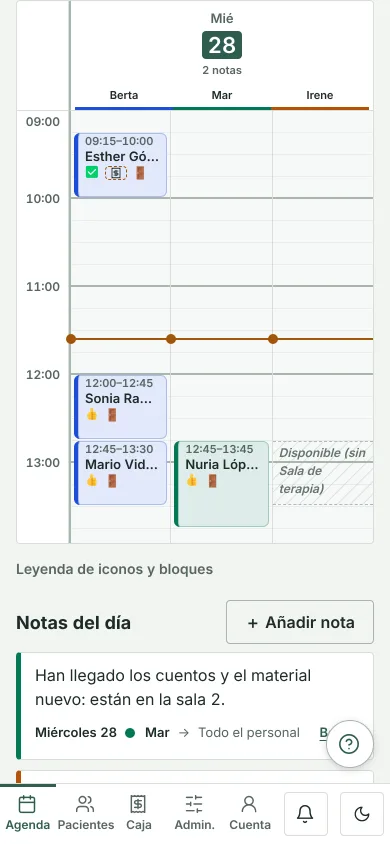
With Ticta: with “All” you see the whole team’s afternoons and which room is free at each time, and the portal only offers the hours inside each therapist’s working hours.
Source: J Child Psychol Psychiatry, 2016
-
14 yearsSpanish data protection act, art. 7
The patient is seven
Under 14, consent to process a child’s data is given by their mother, father or guardian. And the appointment emails have to reach them, not an email address the child does not have.
With Ticta: you mark the file as a minor and choose their responsible adult, even if that adult is not a patient: appointment emails go to them, several siblings can share one and the diary shows “Minor · responsible”.
Source: Organic Act 3/2018, art. 7
-
3 for 2therapists for two rooms
Two patients, one therapy room
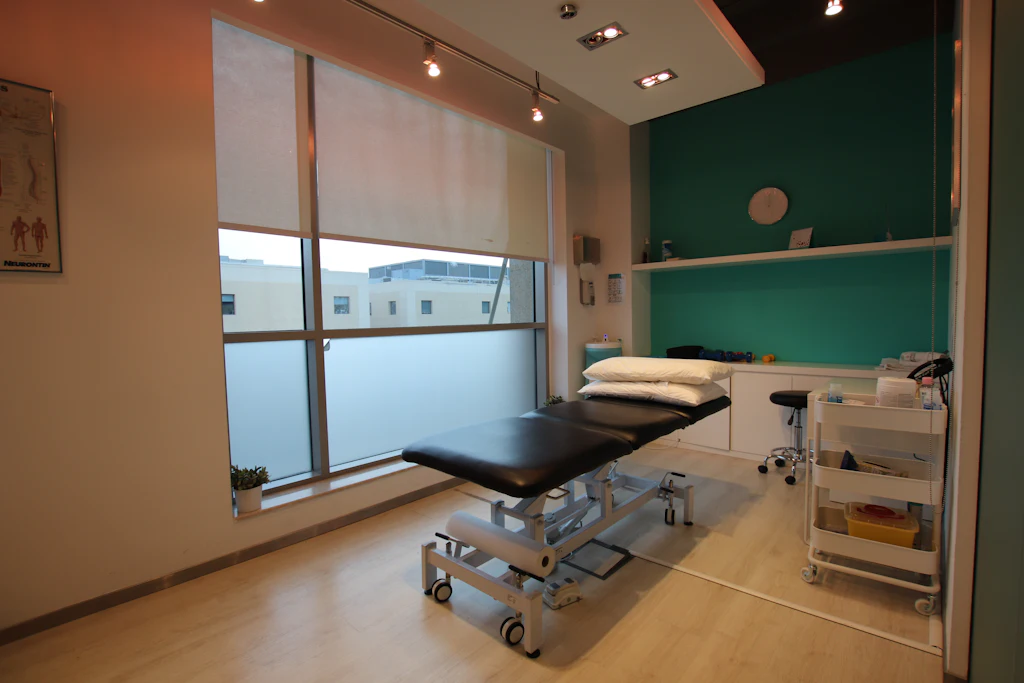
Someone books a session in room 2 without seeing that a colleague already had it at that time: it happens when there are more therapists than therapy rooms, or with the group room. You find out with two families in the corridor.
With Ticta: if a room is taken, the diary will not let you book it, not even from the portal: the slot shows as “Available (no therapy room)”. With two rooms, it allows two sessions at once and no more.
-
45 minof room and therapist standing idle
The five o’clock session nobody cancels
A school trip, a temperature or a change of plans at home, and the afternoon session sits empty without anyone saying so. It is the slot another family had been waiting weeks for.
With Ticta: an email reminder 12 hours before to the responsible adult, with no limit: if they cannot come, they cancel in time from the portal and the slot is free again.
It is not poor organisation: you are keeping the diary, the rooms and the packs in your head while you do therapy. Ticta takes that on so you can focus on your patients.
Work out how much your speech therapy practice loses each month with a hand-kept diary
Tell us about your centre
A self-employed speech therapist or a practice with several, for children or adults, with therapy rooms and groups: the day is organised the same way. Who sees each patient, when, in which room, and what pack they have left. Answer and the rest of the page adjusts to your practice.
Your diary 2 practitioners shared machine with packs
Add an appointment
Tuesday’s diary is open. Tap a free slot and watch what happens to the machine and the pack.
Tuesday Everyone’s diary
The machine · 1 unit
- 9:00Carmen L.
- 10:00Nuria G.
- 12:30Elena T.
Machine 30 min pack · Lucía M.
7 of 10 sessions
This is a test diary with made-up data and a single test appointment: tap a free slot to put it or move it there, or try one of these:
How it works inside
Real screenshots of the app, with a made-up speech therapy practice and fictitious data: each step, on a computer and on a phone.
See the demo


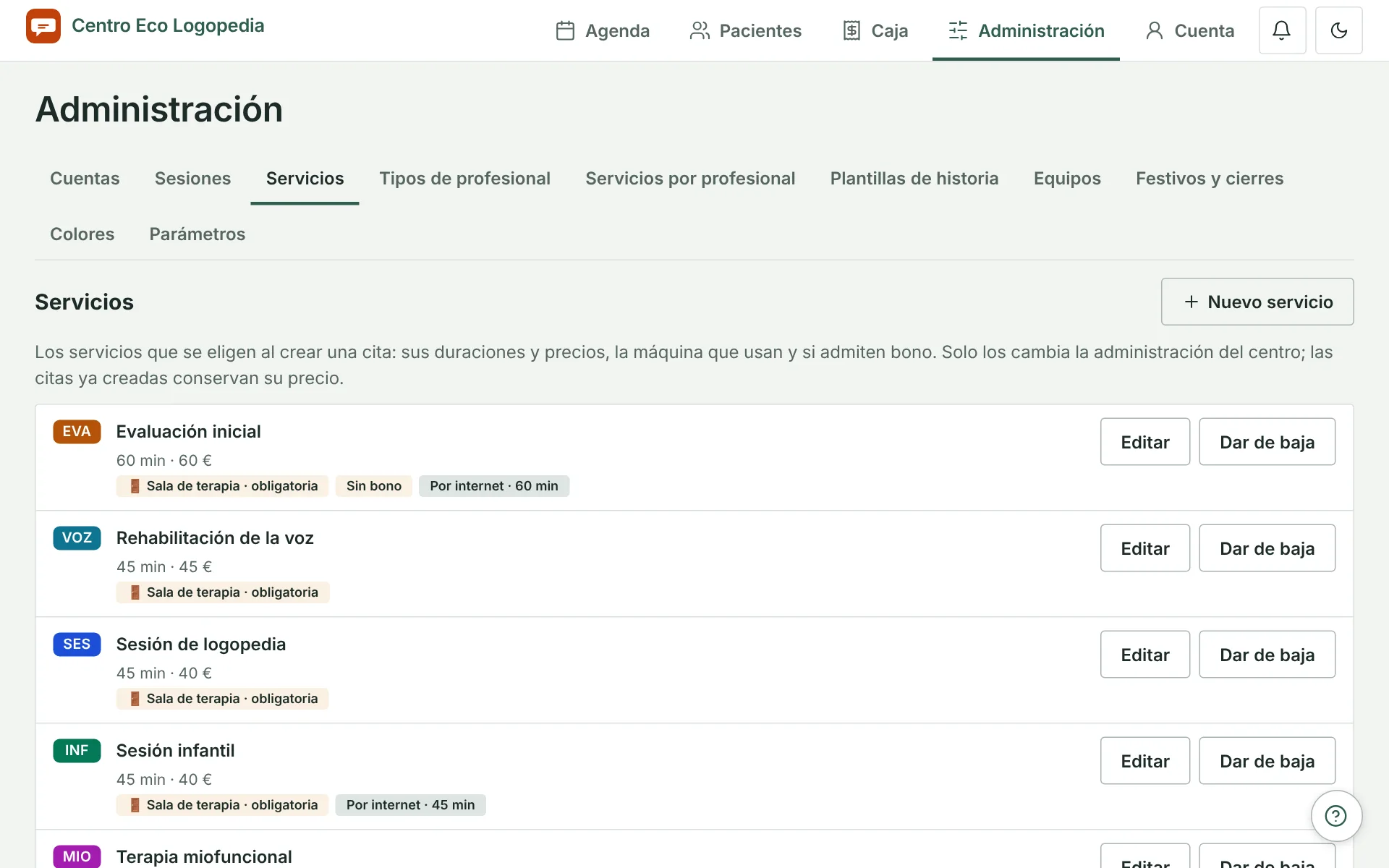


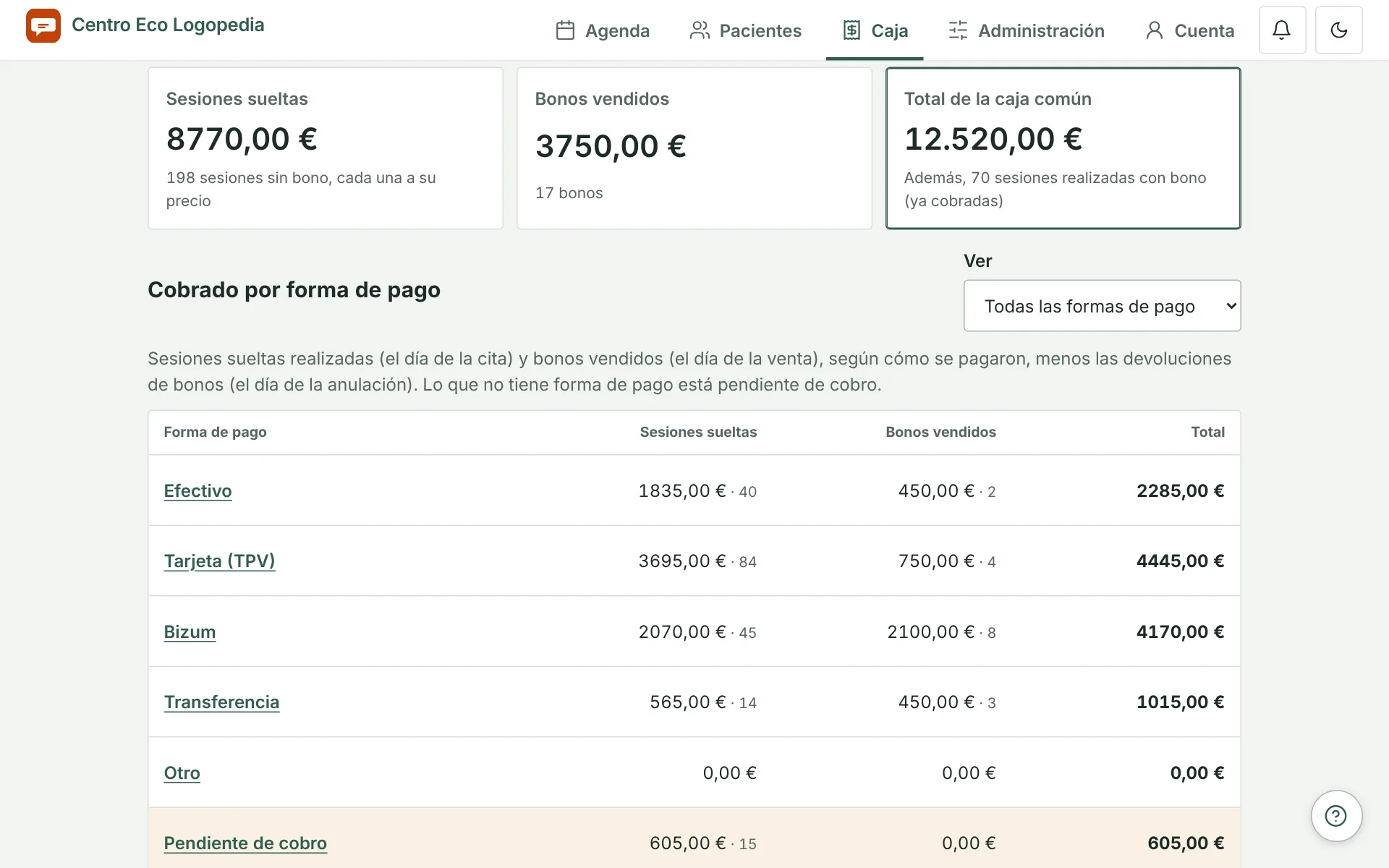

Works in the browser on a computer, tablet or phone, with nothing to install.
-
The machine can’t be double-booked
Several practitioners and one machine: if one has it at 10:00, the others see «Available (no machine)» at that time.
On a computerOn a phoneThe whole practice’s week, on the reception computer · The whole team’s day, on a phone -
The pack counts itself down
When the session is marked Attended or No-show, the 4 children’s sessions pack drops by one, no notebook. If you would rather a no-show did not use a session, you set it that way.
On a computerOn a phoneNew appointment with a pack and a machine · When booking, it suggests the right pack -
Families book without creating an account
With their email or their phone, even at 22:40: they choose the session type, the therapist and the time. You decide what can be booked online: sessions yes, the initial assessment only through the practice, for example.
On a computerOn a phoneThe practice’s appointment types · Your patients choose the appointment type -
An email when they book and another before
When the appointment is made, changed or cancelled and 12 hours before, with the day, time and the centre’s address.
On a computerOn a phoneOne practitioner’s week · And the time, with no account to create -
Takings ready for your accountant
What’s been taken from single sessions and packs, by payment method and by practitioner. You export it to Excel.
On a computerOn a phoneThe month’s takings, ready for your accountant · Their day, on a phone
Works in the browser on a computer, tablet or phone, with nothing to install.
Your data is yours
- Each practice, apartKept separate inside the database too, not just on screen
- Encrypted copies of each practiceEach practice has its own encrypted copies, kept separately
- If you leave, it goes with youWe hand over all your practice’s data (client records, appointments, session packs, takings and notes), in a standard format
- 24/7 help from an assistantAn AI assistant answers at any hour and does not look at your clients’ clinical data. Before your question reaches it, we try to strip names, phone numbers and emails
- Who opens each recordIn healthcare practices, every look at the notes is logged
What has changed lately
Almost everything is configurable: each centre decides, not the software.
A selection from October 2026: the hardest things to build and the ones that adapt most to each centre. Many come from the app’s suggestion box.
- RecordsYour own question templates, branching on each answer, for each practitioner type23 Oct
- NoticesEach practitioner gets an email with a picture of their week when an appointment is added, moved or removed23 Oct
- TakingsCharge no-shows or not for each appointment type, with the amount the centre chooses23 Oct
- TakingsData for your accountant in Excel and CSV: one row per session, pack sold or no-show charged23 Oct
- PacksEach centre decides whether a no-show uses up a session from the pack22 Oct
- PortalEach centre chooses which days of the week can be booked online21 Oct
- PortalThe machine each appointment type requires is also respected in online bookings20 Oct
- PortalEach centre has its own booking portal address19 Oct
- DiaryLocked closures, and appointment types that can only be booked online if you want13 Oct
- NoticesYour centre writes the emails your clients receive12 Oct
Who makes it
[Miguel’s photo]We build Ticta ourselves. It was born from solving the real day-to-day problems of a small practice, and every screen came from something that was needed.
Packs tied to a machine, one diary for several practitioners, bookings without phone calls. Today a physiotherapist and a beauty salon test it and tell us what is missing. If your centre needs something, ask for it in the app’s suggestion box and we will answer you ourselves.
- You hear back from
- the team that builds it
- Write to us
- [email protected]
What it costs elsewhere
What they publish on their official websites, with 21% Spanish VAT added to all of them so they compare like for like. Example practice: 3 practitioners with a diary.
| What it costs elsewhere | Ticta | Tufisio | Clinic Cloud | Docfav |
|---|---|---|---|---|
| 1 practitioner, with VAT | €19 (€15.70 + VAT) | €18.09 (€14.95 + VAT), self-employed physio | €35.09 (€29 + VAT), 1 diary | From €33.25; VAT not stated (€40.23 with VAT) |
| 3 practitioners, incl. VAT | €21 (€17.36 + VAT) | Clínica Pro: €48.34 (€39.95 + VAT). Number of physios not published | Pro, 3 diaries: €59.29 (€49 + VAT) | Not published: depends on staff numbers |
| Paid extras | None today. WhatsApp, SMS and new modules are extra | AI from €3.50 a month + €0.50 per visit; Verifactu at extra cost | Notes AI: €20 + VAT per user; extra diary: €10 + VAT; SMS on request | No extras published |
| Rooms, cabins or machines | Yes | Rooms and equipment advertised | Not advertised | Diary by practitioner and surgery (dental) |
| Machines with units and an “Available (no machine)” band | Yes | Not advertised | Not advertised | Not advertised |
| Packs tied to a machine | Yes | Not advertised | Not advertised | Not advertised |
| Booking without creating an account | Yes, with email or phone | Not advertised | Not advertised | Not advertised |
| Verifactu | No invoicing: takings and income, and data for your accountant | Yes, at extra cost | Yes, from the Mini plan | Yes |
| WhatsApp reminders | Built as a paid extra; live once we pick providers | Yes | Yes | Yes |
| All your practice’s data handed over if you leave | Yes, in a standard format | Not advertised | Not advertised | Not advertised |
| Minimum term | No minimum term | Not advertised | No minimum term | Not advertised |
Public data from each provider as of 21/10/2026; it may have changed. It comes from their official websites. Where they publish prices without VAT, we add 21% (mainland Spain and the Balearics). “Not advertised” means it does not appear in what they publish, not that they don’t have it. For a single practitioner there are cheaper options, even free ones. If something has changed, write to us and we will correct it. Sources: Tufisio, Clinic Cloud, Docfav.
€19
a month,
and stays put
- 1–2 practitioners€19
- 3 practitioners€21
- 4 practitioners€23
- 5 or more practitioners€25
With 2 practitioners: €19 a month including VAT (€15.70 + VAT).
It covers the features of the base plan and those added to it, without new modules offered separately or WhatsApp and SMS reminders. No minimum term: leave whenever you like and take your practice’s data with you. The price holds while your subscription stays active.
Two-week trial from sign-up: if you cancel within that time, you pay nothing.
1–2 practitioners: €19 (€15.70 + VAT). 3: €21 (€17.36 + VAT). 4: €23 (€19.01 + VAT). 5 or more: €25 (€20.66 + VAT), even with 10. Reception and admin staff don’t count. Founders terms
Work out how much your speech therapy practice loses each month with a hand-kept diary
Founders Edition: 15 places for the first practices
Apply for a place I’d rather ask for more informationYour Founders place Ask for information
Founders Edition · 15 placesNo commitment: we reply ourselves
- €19 a month, VAT included (€15.70 + VAT)
- Full base plan, without WhatsApp or SMS
- Two-week trial: cancel and you pay nothing
- No minimum term
- A demo with test data
- A reply from the person who builds it
- No commitment and no cost
We will answer you ourselves, with a demo on test data and the next steps. Applying does not commit you to anything.
Questions
Is it right for my speech therapy practice?
If you work by appointment, yes: a self-employed speech therapist or a practice with several, for children or adults, working on language, voice, swallowing or myofunctional therapy, with shared therapy rooms and groups. When you sign up we decide with you whether it is a health centre (with clinical records) or premises without them.
How do I handle patients who are children?
You mark the file as a minor and choose their responsible adult (mother, father or guardian), who need not be a patient. Appointment emails go to that adult, several siblings can share the same one, and the file and the appointment show “Minor · responsible”. At 18, admin gets a notice to review the file.
How do I share the rooms when there are more therapists than rooms?
Each session type has its own required room. With two therapy rooms, the diary allows two sessions at once and a third shows as “Available (no therapy room)”, not bookable from the portal either. The group room is separate.
Can I sell session packs?
Yes. You create each pack type with its sessions, its price and, if you like, its length, its room and its expiry, such as “4 children’s sessions” or “8 speech therapy sessions”. When you book, it suggests the right pack and counts down by itself when the appointment is marked Attended or No-show; your practice decides whether a no-show uses up a session.
Can I run groups, such as social skills?
Yes. A group session has its capacity and its list of patients, and the diary shows how many places are left. For now the portal books individual sessions: people join a group through the practice.
How much does it cost?
From €19 a month, VAT included (€15.70 + VAT), depending on how many speech therapists have their own diary; reception and admin do not count. It is the Founders Edition price: no minimum term, and it stays the same while you keep your subscription.